
UBO Identification
Get Started > Portal User Guide > UBO Identification
Overview:
Ultimate Business Owner (UBO) Identification lets you discover and review the ownership structure of a company customer, including corporate and individual shareholders, directly from the ClearDil portal.
Service Description:
ClearDil retrieves company ownership data from the Global Database and presents it on the company customer profile. You can visualise the ownership hierarchy, review verified shareholders, and trigger UBO verification from the Organization tab.
Getting started:
Open a COMPANY customer profile, then select the Organization tab. From there you can sync ownership data, display structure details, download results, and run Verify UBOs.
Alternatively you can integrate our API in your system. See the API Ultimate Business Owner Identification guide.
Organization structure:
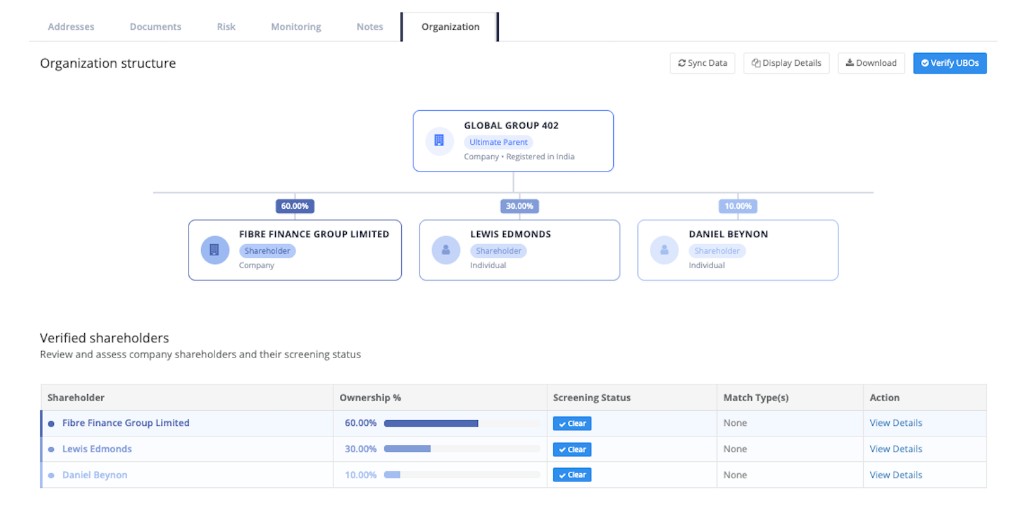
Ownership chart:
The organization chart shows the company as the ultimate parent, with linked shareholders and their ownership percentages. Shareholders may be companies or individuals.
Verify UBOs:
Use the Verify UBOs action to run identification against the company’s ownership data and refresh the verified shareholders view.
When you click Verify UBOs, the system creates a ClearDil entity (customer record) for each shareholder in the ownership structure. Each of those shareholders is then screened against a determined screening scope, so you can review their screening status and match types from the verified shareholders table.
Sync Data / Display Details / Download:
- Sync Data — refresh ownership information from the Global Database.
- Display Details — show additional structure details for the selected company.
- Download — export the organization / ownership information.
Verified shareholders:
The Verified shareholders table lists each shareholder with:
- Ownership % — stake held in the company
- Screening Status — screening outcome for the shareholder (for example Clear)
- Match Type(s) — match categories when screening returns hits
- View Details — open the shareholder record for further review